

We want you to get notified about emergencies and other community alerts via your home phone, cell phone, text message or email by signing up for HARNETT ALERTS.
This notification system helps local officials provide you with critical information quickly in a variety of situations such as fire, flood, hazardous materials incidents, unexpected road closures, shelter in place, dangers, missing persons and evacuation of buildings or neighborhoods.
In the event of an emergency, local officials will use HARNETT ALERTS to call homes/businesses and cell phones, send texts and email our residents. Many messages that are sent only go to opt-in persons who have signed up - meaning if you do not sign up - you may miss some information. In the event of a life threatening emergency, we can activate a WEA or Wireless Emergency Alert that will go to all persons phone in a geographical area (like amber alerts). We can also send public safety alerts, which is information that is not life threatening.
TYPES OF WIRELESS EMERGENCY ALERTS
 |
CIVIL DANGER WARNING | A warning of an event that presents a danger to a significant civilian population. The CDW, which usually warns of a specific hazard and gives specific protective action, has a higher priority than the Local Area Emergency (LAE). Examples include contaminated water supply and imminent or in-progress military or terrorist attacks. Public protective actions could include evacuation, shelter in place, or other actions (such as boiling contaminated water or seeking medical treatment). |
 |
FIRE WARNING | A warning of a spreading wildfire or structural fire that threatens a populated area. Evacuation of areas in the fire’s path may be recommended by authorized officials according to a state law or local ordinance. |
 |
HAZARDOUS MATERIALS WARNING | A warning of a release of nonradioactive hazardous material (such as flammable gas, toxic chemical, or biological agent) that may recommend evacuation (for an explosion, fire, or oil spill hazard) or shelter in place (for a toxic fume hazard). |
|
LOCAL AREA EMERGENCY | An Local Area Emergency or Civil Warning is emergency message that defines an event that by itself does not pose a significant threat to public safety and/or property. Examples include a disruption in water, electric or natural gas service; road closures due to excessive snowfall; a potential terrorist threat where the public is asked to remain alert. |
 |
LAW ENFORCEMENT WARNING | A law enforcement warning can come for the purpose of warning of a bomb explosion, riot, or other criminal events (e.g. a jailbreak). An authorized law enforcement agency may blockade roads, waterways, or facilities, evacuate or deny access to affected areas, and arrest violators or suspicious persons. |
 |
RADIOLOGICAL HAZARD WARNING | A warning of the loss, discovery, or release of radiological material. Examples include the theft of a radioactive isotope used for medical, seismic, or other purposes; the discovery of radioactive materials; a transportation (aircraft, truck or rail, etc.) accident that may involve nuclear weapons, nuclear fuel, or radioactive wastes. Authorized officials may recommend protective actions to be taken if a radioactive hazard is discovered. |
REGISTER FOR HARNETT ALERTS - OPT IN
To Register for Severe Weather & Emergency Notifications on your cell phone:
- "Click Here"
- In the Search Bar, type "Harnett County" and click Continue
- Enter all fields for Account information
- Confirm your mobile carrier
- Check your email for Rave confirmation
- Click registration hyperlink in your inbox
- Enter 4 digit code that was texted to you and click Finish
To Activate your Account, you must complete one more step to opt-in for Alerts:
- Login to the Rave System by clicking here
- Go to "My Account" by accessing the figure at the top right of the webpage.
- There will be three tabs at the top center, click Opt-In Lists
- Check the box on the right hand side under subscribe for "Public Opt-in" and "NWS Weather Alerts", or whichever you prefer to receive.
- You may Sign-Out at this time, no further action required
TURN ON GOVERNMENT ALERTS ON YOUR CELL PHONE
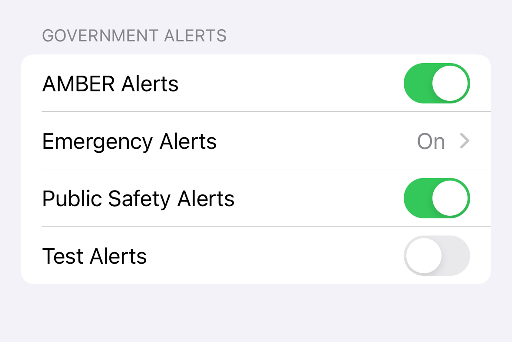 |
IPHONE USERS - To turn on government alerts (WEA) on your phone, navigate to Settings > Notifications, scroll to the bottom, and enable Government Alerts or Emergency Alerts. |
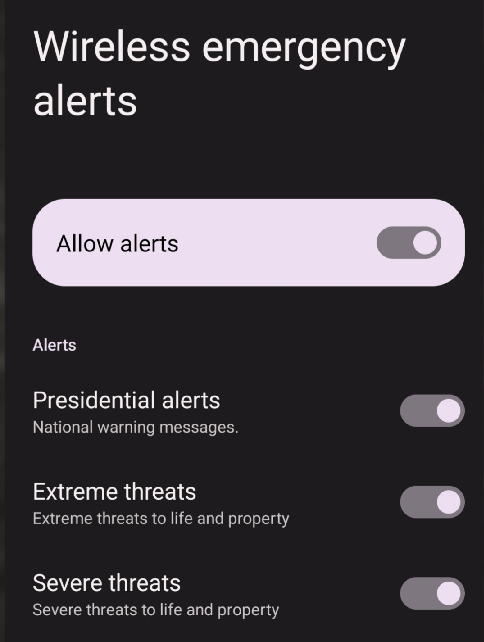 |
To turn on government or emergency alerts on Android, navigate to Settings > Safety & emergency > Wireless emergency alerts and toggle "Allow alerts" on. You can customize settings to receive extreme threats, severe threats, and AMBER alerts. On some devices, this is located under Settings > Notifications > Advanced Settings. |
FREQUENTLY ASKED QUESTIONS ABOUT HARNETT ALERTS
CLICK HERE FOR FREQUENTLY ASKED QUESTIONS ABOUT HARNETT ALERTS
If you have any questions you may contact our office at 910-893-7580 and ask for Emergency Management or email HCEM@harnett.org.